AIS authentication
Authors/Creators
Description
Users are invited to use the NICE password for AIS authentication.
As announced in CNL June-August 2006 (see http://www.cerncourier.com/articles/cnl/3/6/14/1) it is possible to use the NICE username and password to log on to AIS. The procedure is now fully operational and users can themselves reset the AIS password such that the NICE password will be used for authentication required by AIS applications.
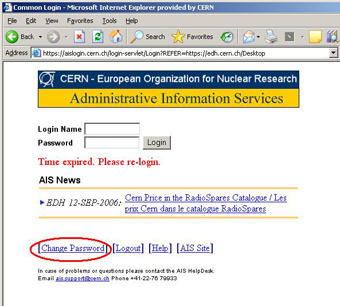
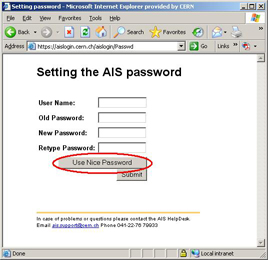
We strongly recommend CERN users who have a NICE account (this is the case of most users) to do this, with the objective to reduce the number of passwords they need to remember. This can be achieved very easily, directly from the Change Password option on the AIS login (https://aislogin.cern.ch/). Users should just select the '[Change Password]' option displayed at the bottom of the page, provide the 'Old Password' and then click on the button 'Use Nice password' followed by 'Submit'.
Change Password option on the AIS login window
Setting the AIS password - Use Nice Password
It should be noted that the procedure allows use of the NICE password for AIS authentication, and not vice-versa. Please look at http://cern.ch/security/passwords/ to select a good password that will be accepted by the NICE system.
The User Support Team
Other (French)
Dès aujourd'hui, utilisez votre mot de passe NICE pour vous authentifier auprès des Services AIS !
Comme il a été annoncé dans le Bulletin d'information du CERN sur l'informatique (CNL) de juin-août 2006 (voir sous http://www.cerncourier.com/articles/cnl/3/6/14/1), vous pouvez utiliser votre nom d'utilisateur et votre mot de passe NICE pour vous connecter aux Services d'informatique administrative (AIS). La procédure est désormais tout à fait opérationnelle: vous pouvez remplacer vous-mêmes votre mot de passe AIS par votre mot de passe NICE pour que celui-ci vous donne accès aux applications AIS.
Nous recommandons vivement aux utilisateurs du CERN qui disposent d'un compte NICE (c'est le cas de la plupart des utilisateurs) d'appliquer cette procédure, qui permet de réduire le nombre de mots de passe à mémoriser. Cette opération très simple peut être effectuée directement à partir de l'option «Change Password» dans la fenêtre «Login» de AIS (https://aislogin.cern.ch/). Il vous suffit de sélectionner l'option «[Change Password]» au bas de la page, de saisir l'ancien mot de passe («Old Password») et de cliquer sur «Use Nice password», puis sur «Submit».
Option «Change Password» dans la fenêtre «Login» de AIS.
Option «Settings» pour le Password AIS - Utiliser le Password Nice.
Il est à noter que cette procédure permet d'utiliser le mot de passe NICE pour s'authentifier auprès des Services AIS, mais pas l'inverse. Vous trouverez à l'adresse http://cern.ch/security/passwords/ des recommandations pour choisir un mot de passe qui soit compatible avec le système NICE.
L'Equipe d'appui aux utilisateurs
Files
gi-2006-181_ais-login-web.jpg
Files
(177.5 kB)
| Name | Size | Download all |
|---|---|---|
|
md5:a2340ebe0e37716d9fbee68d73d0e518
|
110.9 kB | Preview Download |
|
md5:2e1876013eef2a6ee09a12e36d429b61
|
66.7 kB | Preview Download |
Additional details
Identifiers
- CDS
- 987598
- CDS Report Number
- BUL-GI-2006-181
- Aleph number
- 000043643MMD